

Symbol Lookup for Reference Data
The reference data plugin uses a dedicated dialog box for symbol search and selecting reference data. This tutorial will show an example of the symbol search implementation.
If your reference data uses symbols from your main chart, this implementation will essentially be identical. However, if you are searching for other symbols with this plugin, you will need to modify the implementation.
Refer to the Lookup section of the QuoteFeeds tutorial for steps on implementing your own lookup driver.
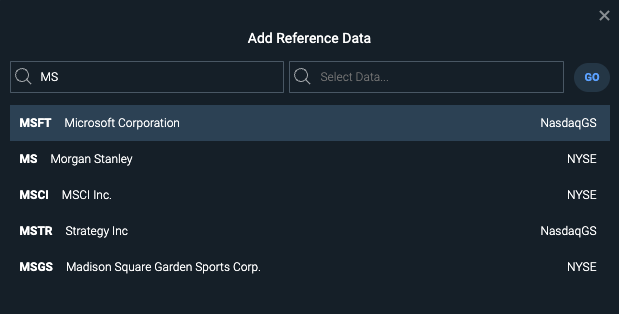 Figure. Reference data symbol lookup dialog.
Register a Symbol Lookup for reference data symbol search
Make sure to implement any necessary API request code for symbol lookup.
Note: The example below uses the APIRequest function from SPGIReferenceData.js. You will need to modify this function or create your own API request to fetch data.
CIQ.activateImports(baseQuoteFeed, symbolLookupBase);
CIQ.ChartEngine.Driver.Lookup.ReferenceData = function (exchanges) {};
CIQ.inheritsFrom(
    CIQ.ChartEngine.Driver.Lookup.ReferenceData,
    CIQ.ChartEngine.Driver.Lookup
);
CIQ.ChartEngine.Driver.Lookup.ReferenceData.prototype.acceptText = function (
    text,
    filter,
    maxResults,
    cb
) {
    APIRequest({
        type: "SYMBOLS",
        identifier: text
    })
        .then((response) => {
            cb(/* provide symbol array */);
        })
        .catch((error) => {
            errorNotification(error);
        });
};